
Room camera
Each room has its own camera. It decides which piece of the room shows on screen. In a room the size of the screen, the camera stays still; in a bigger room, it can follow the player.
Open the room, leave no instance selected and look at the Câmera section in the Inspector:
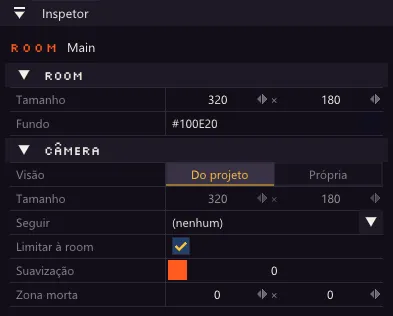
| Option | What it does |
|---|---|
| Visão (view) | Do projeto (from the project) uses the resolution of the game (for example 320 × 180). Própria (its own) lets this room show an area of another size. |
| Tamanho (size) | The width × height of the area shown. It can only be changed with the Própria view. |
| Zoom | How much the world is magnified. With 4, each sprite pixel becomes 4 game pixels and the camera shows a quarter of the width and height. The interface is not magnified: that is how you do pixel art in a high-resolution game, such as 1920 × 1080. |
| Seguir (follow) | The object the camera follows, or (nenhum) (none) for a still camera. |
| Limitar à room (limit to the room) | The camera shows nothing outside the room, even with the player at the edge. |
| Suavização (smoothing) | From 0 to 10. At 0, the camera sticks to the target; the higher it is, the more slowly it arrives. |
| Zona morta (dead zone) | Width × height of a rectangle in the middle of the screen in which the target moves without the camera moving. Good for platformers. |
In the room view, a dashed rectangle shows the area the camera covers.
If the camera follows an object, it already starts centered on it when the room opens.
To control the camera from the code, see Camera following the player.